Retail POS - offline billing for grocery & retail shops
Barcode billing, inventory, khata (customer credit), suppliers and reports - all in one desktop app that works with zero internet. Built for a single store counter, one license per branch.
One-time or annual license · works fully offline · single branch
Why Retail POS
Built for the shop counter, not a data centre
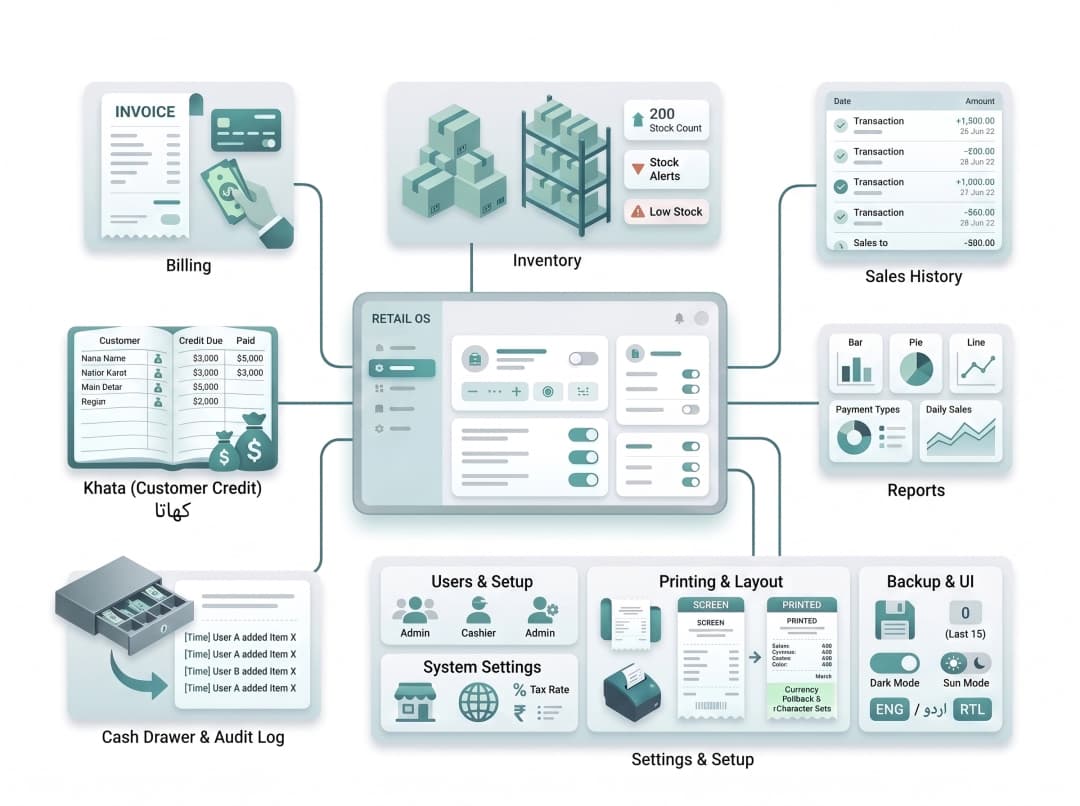
Most grocery and retail shops don't need a cloud platform - they need billing, stock and khata that work every single day, internet or not. Retail POS runs entirely on your counter's PC with a local database, so a dropped connection never stops a sale.
Features
Everything a retail counter needs
Billing
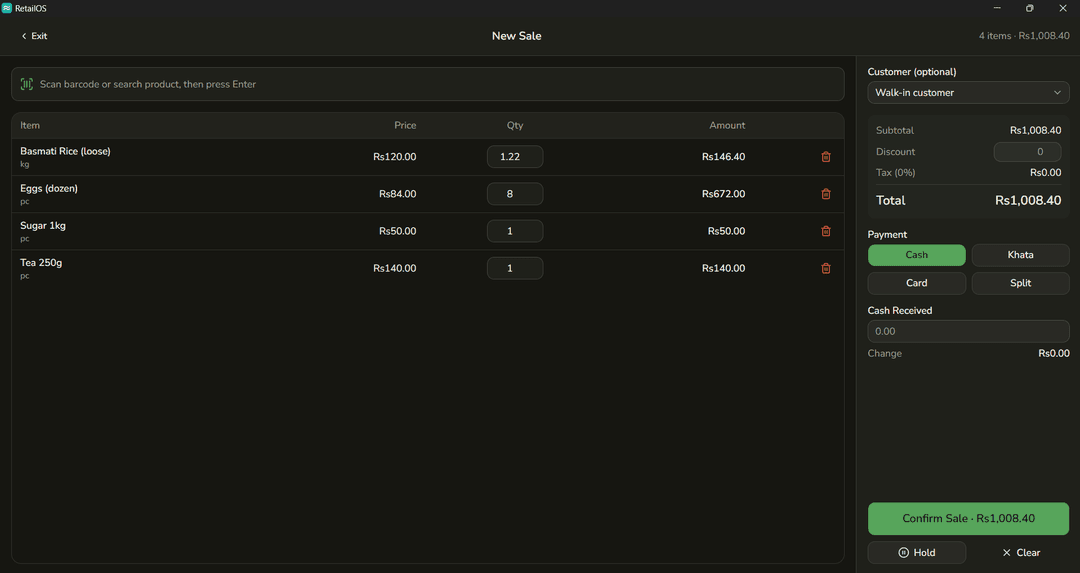
- Barcode scan with manual search fallback
- Weight-based items (kg/g) with per-line qty adjust
- Discounts & auto tax calculation
- Cash, khata (credit), card & split payments
- Hold / resume bill, void sale
- Receipt preview & thermal printing
Inventory
- Full product catalog: name, barcode, category, unit, cost/sale price, stock
- Low-stock threshold & expiry tracking
- Stock adjustments with audit logging
- CSV bulk import
- Barcode label printing (CODE128, multi-label sheet)
Khata (Customer Credit)
- Customer profiles with credit limit & running balance
- Ledger view of credit and payment transactions
- Record payments received
Suppliers & Purchases
- Supplier profiles with payable tracking
- Multi-line purchase entry - auto stock-in & cost update
- Purchase status: unpaid, partial, paid
- Purchase history per supplier
Sales History
- List and void past sales
- Partial returns per item, capped against already-returned qty
- Refund as cash or khata credit, stock restored automatically
Cash Drawer
- Open drawer with starting float
- Close with counted cash
- Shift reconciliation - expected vs counted, with difference
Reports
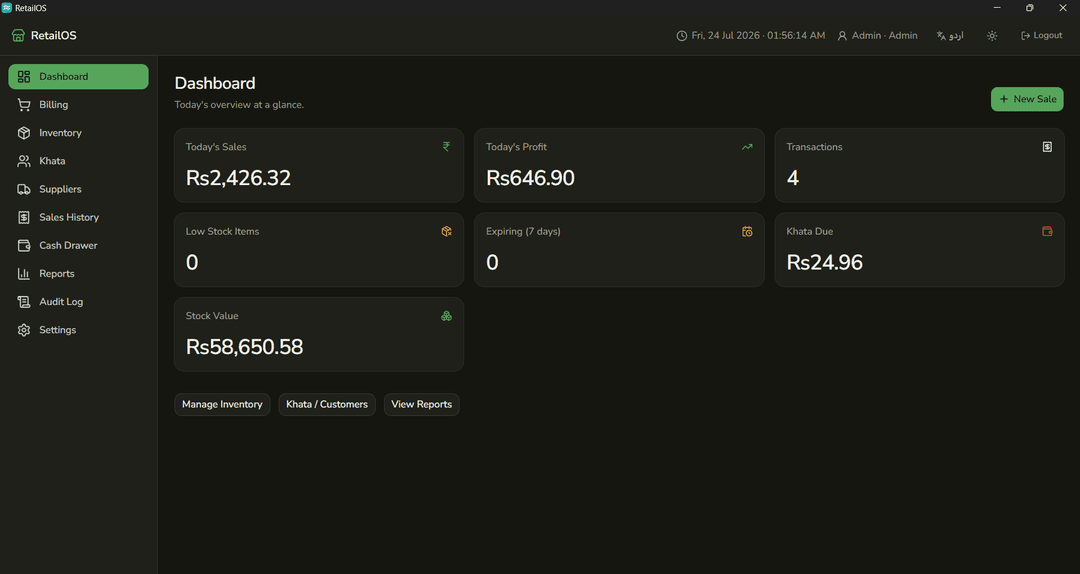
- Dashboard KPIs & date-range sales summary
- Profit & loss, best-sellers and slow movers
- Cashier-wise sales
- Low-stock and expiring-stock lists
- CSV export
Audit Log
- Tracks price changes, voids and stock adjustments
- Attributed to the logged-in user
- Admin-only view
Users & Setup
- Role-based accounts: admin, manager, cashier
- First-run setup wizard - store info, tax, currency
- Enable, disable or remove staff accounts
Settings
- Store info, tax rate and currency symbol
- Receipt layout, paper size, printer selection with live preview
- Manual backup (keeps last 15) & restore
- Dark mode, bilingual UI (English/Urdu, RTL-aware)
Printing
- Thermal printer output matches on-screen receipt exactly
- Currency symbol fallback for limited printer character sets
One license, one branch - no cloud plan required
Retail POS is offline-first and doesn't currently support multiple branches or cloud sync, so there's no recurring cloud subscription. Choose the licensing option that fits your shop:
One-time license
Pay once, use the current version on one counter for as long as you like. Best if you want to avoid recurring fees.
Annual license
A lower yearly fee that includes updates, new features and priority support for the year. Best if you want the app to keep improving.
Use cases
Built for shops that sell every day
Grocery & cash & carry
Barcode billing, weight-based items and supplier purchases in one counter.
Mini marts & convenience stores
Fast checkout with low-stock alerts so shelves never run empty unnoticed.
General & hardware stores
Barcode-driven billing and supplier purchase tracking for wide, mixed catalogs.
Neighbourhood shops with khata
Track customer credit and running balances the way local shops actually sell.
FAQ
Retail POS questions, answered
Ready to modernize your shop counter?
Tell us about your store and we'll walk you through Retail POS and licensing options.