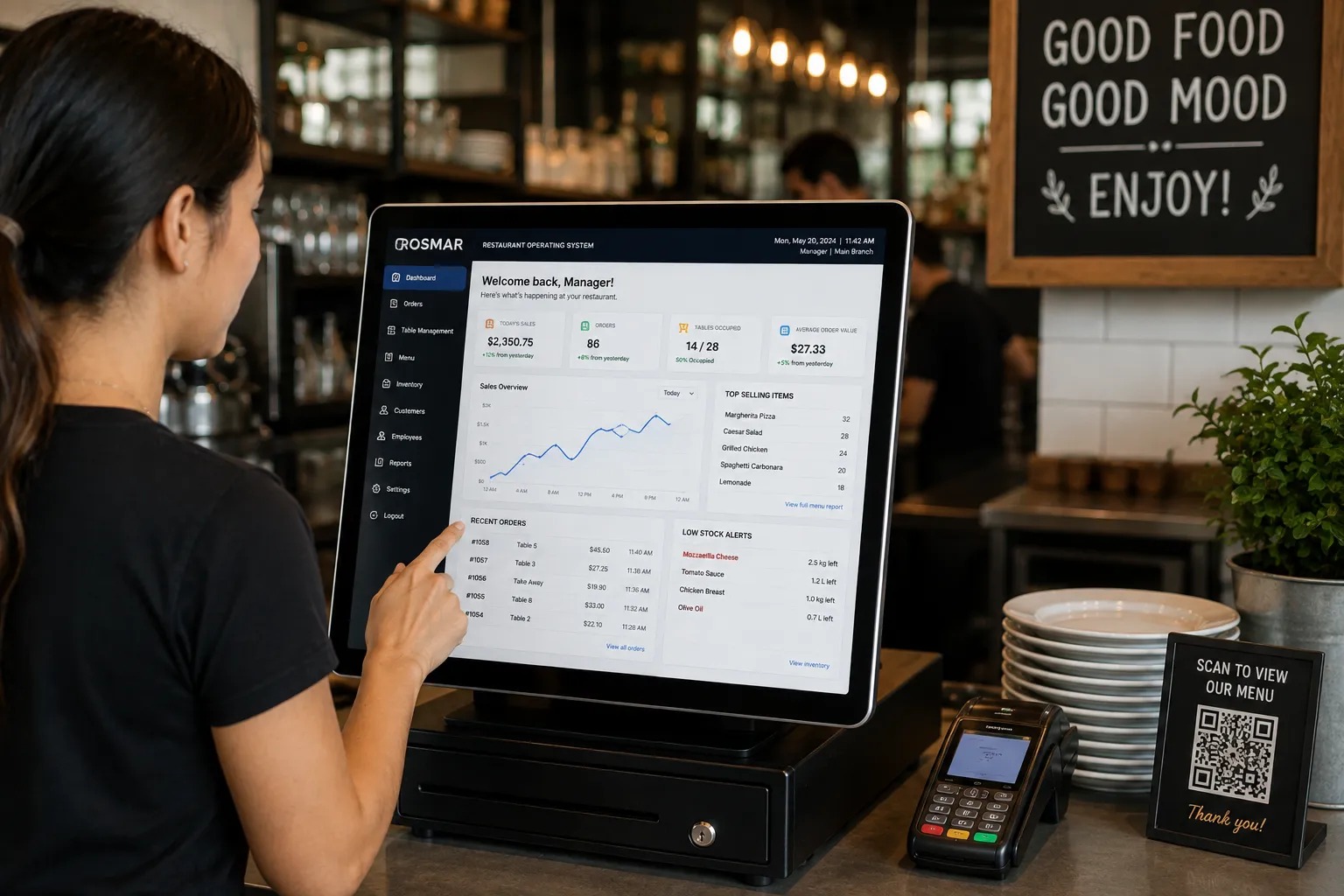
Running a restaurant today means juggling orders, kitchen tickets, inventory, staff schedules, delivery apps, and customer data — often across five or six disconnected tools. This is exactly the problem a restaurant operating system was built to solve.
What Is a Restaurant Operating System?
A restaurant operating system, often shortened to restaurant OS, is a unified software platform that runs every core operation of a restaurant — front-of-house, back-of-house, and management — from a single connected system instead of stitching together separate apps for billing, kitchen orders, inventory, and reporting.
Think of it the way you'd think of an operating system on a computer: it doesn't just do one job. It's the underlying layer that every other function runs on top of.
In a restaurant context, that can include:
Point of sale (POS) — taking orders and processing payments
Kitchen Display System (KDS) — routing tickets to the kitchen in real time
Inventory management — tracking stock as it's used, not just at month-end
Multi-branch management — syncing menus, pricing, and reports across locations
Online ordering and kiosks — extending the same system to digital channels
Reservations and CRM — managing tables, guests, and repeat customers
Reporting and analytics — creating a single source of truth for how the business is performing
The key idea behind any true operating system for restaurant businesses is integration. Every module communicates with the others, so restaurant teams can manage orders, kitchen workflows, inventory, reporting, and other operations from a more connected environment.
You can see how these capabilities come together in the POSflow Restaurant POS System & Management Software.
Restaurant Operating System vs Traditional POS: What's the Difference?
This is one of the most common points of confusion, so it's worth being precise about it.
A traditional POS is primarily a billing tool. It's built to take an order, calculate the total, and process payment. Anything beyond that — inventory, multi-branch reporting, or kitchen routing — may depend on the particular system and additional integrations.
A restaurant operating system, by contrast, treats the POS as one part of a broader restaurant management platform.
Some of the practical differences include:
Feature | Traditional POS | Restaurant Operating System |
|---|---|---|
Core function | Billing and payments | Full restaurant operations |
Multi-branch support | Often limited or add-on | Designed for centralized management |
Kitchen integration | May require a separate KDS | Can connect directly with POS |
Offline capability | Varies by platform | Can support local/offline operations |
Data | Often separated by feature | Centralized across operations |
Growth path | May require additional systems | Designed to scale with the business |
If you're comparing restaurant computer operating systems for a growing business — especially one planning to open more than one location — this distinction matters more than any single feature on a specification sheet.
Choosing a system that only handles billing today can create additional complexity as your restaurant adds inventory management, online ordering, kitchen displays, reporting, or more locations.
Why Restaurants Are Moving From POS to Full Operating Systems
Several operational challenges are pushing restaurants toward more connected restaurant management systems.
Multi-Branch Growth
As restaurants expand to two, three, or more branches, keeping menus, pricing, and reporting consistent across locations becomes harder with disconnected tools.
A restaurant OS can centralize these operations and give management better visibility across locations.
Real-Time Inventory Pressure
Rising food costs mean restaurants cannot afford to discover major stock discrepancies only at the end of the month.
When inventory is connected with menu items and sales, restaurant managers can get a clearer view of how stock is being used.
Online Ordering and Digital Channels
Restaurants increasingly receive orders from multiple channels, including dine-in, takeaway, online ordering, and kiosks.
A connected restaurant operating system can help bring these workflows into a more unified operational environment.
Remote, Multi-Location Management
Restaurant owners managing several locations often need access to sales, inventory, and performance information without physically visiting every branch.
Cloud-connected restaurant systems make remote reporting and centralized management possible.
If you want to understand this technology in more detail, read our guide to cloud-based restaurant POS systems.
Unreliable Internet in Many Markets
Restaurants cannot simply stop taking orders because the internet connection goes down.
For this reason, offline capability can be an important factor when choosing restaurant software.
Systems that keep core order-taking and billing functions running locally can provide more reliability, while cloud features synchronize when connectivity is available.
Core Modules of a Restaurant Operating System
When evaluating any restaurant operating system, look at how well its modules work together rather than simply checking whether each feature exists.
POS + Kitchen Display System
Orders entered through the POS should move efficiently to the kitchen without requiring staff to manually re-enter them.
A connected Kitchen Display System can help kitchen staff view, prepare, and manage active orders.
Multi-Branch and Menu Management
For restaurants with multiple locations, centralized menu and branch management can reduce repetitive administrative work.
Managers can maintain more consistent menus, pricing, and operational settings across locations.
Inventory Linked to the Menu
Restaurant inventory becomes more useful when it is connected to actual sales and recipes.
This can help restaurant operators monitor stock movement, ingredient usage, purchasing, and food costs.
Online Ordering and Kiosk Support
Digital ordering can give customers additional ways to place orders while keeping restaurant workflows connected with the main system.
Reservations and Table Management
For dine-in and fine-dining restaurants, table management and reservations can help teams organize seating and customer service.
CRM and Customer Data
Customer profiles can help restaurants understand repeat guests, order history, loyalty activity, and other useful customer information.
Cloud Data and Reporting
Cloud-connected restaurant software can provide centralized access to operational information and reports.
Reporting Across Branches
Restaurant managers should be able to review sales, best-selling products, inventory activity, and branch performance without manually combining spreadsheets from different locations.
How to Choose a Restaurant Operating System
Here's a practical framework for evaluating an operating system for restaurant use, whether you run a single café or a multi-branch chain.
1. Map Your Current Pain Points First
Are you losing time on manual inventory counts? Struggling to communicate orders with the kitchen? Managing several branches separately?
Start with the operational problem rather than simply choosing the system with the longest feature list.
2. Check Offline Reliability
Ask vendors directly what happens if the internet connection drops during a busy shift.
If uninterrupted counter operations are important to your restaurant, check whether core billing and order taking can continue offline and how data synchronizes afterward.
POSflow RestaurantOS, for example, is designed to keep core local POS operations running while connected cloud features use internet connectivity.
Learn more about POSflow RestaurantOS features.
3. Confirm It Can Scale With You
Consider whether the same platform can support your restaurant if you move from one outlet to several branches.
Changing restaurant systems after expansion can involve new hardware, staff training, data migration, and operational disruption.
4. Look at Support, Not Just Software
Restaurants operate outside standard office hours.
Reliable support, onboarding, documentation, and access to people who understand the system can be as important as individual software features.
5. Ask About Data Security
Since restaurant software may contain business, sales, staff, and customer information, ask about user permissions, backups, account security, and how cloud data is protected.
6. Understand the Pricing Model
Check whether pricing changes based on locations, terminals, users, KDS screens, cloud features, or other modules.
A low starting price does not necessarily mean the system will remain affordable as your operation grows.
You can view the current RestaurantOS pricing and plans to compare available options.
Frequently Asked Questions
What does "restaurant OS" actually mean?
Restaurant OS is shorthand for restaurant operating system — a software platform designed to connect functions such as POS, kitchen operations, inventory, reporting, and restaurant management instead of relying on completely separate tools for each task.
Is a restaurant operating system the same as a POS system?
No.
A POS primarily handles orders, billing, and transactions. A restaurant operating system is broader and can connect the POS with kitchen displays, inventory, reporting, multi-location management, reservations, online ordering, and other operational tools.
Do small restaurants need a full restaurant operating system, or is a POS enough?
A small single-location restaurant with simple operations may initially need only core POS functionality.
However, as the business adds inventory tracking, kitchen displays, online ordering, more employees, or additional locations, a connected restaurant management platform can reduce the need to manage multiple disconnected systems.
Can a restaurant operating system work without internet?
It depends on the platform.
Some systems require an active internet connection for most functionality, while others support local or offline operations for essential tasks such as order taking and billing.
If internet reliability is a concern for your restaurant, read our complete guide on cloud-based restaurant POS and offline mode.
How much does a restaurant operating system cost?
Pricing varies by provider and can depend on the number of locations, POS terminals, users, and modules required.
POSflow RestaurantOS provides a free starting option alongside paid plans for restaurants that need additional capabilities. You can check the latest RestaurantOS pricing for current plan details.
Final Thoughts
A restaurant operating system is more than a checkout screen. Its purpose is to connect the operational parts of a restaurant — orders, kitchen workflows, inventory, reporting, customers, and locations — so teams spend less time moving information between disconnected tools.
When comparing restaurant software, focus on the problems you need to solve today while also considering what your restaurant may need as it grows.
If you're looking for a platform that combines restaurant POS, Kitchen Display System, inventory, reporting, online ordering, and multi-location management, explore POSflow RestaurantOS.
You can also contact POSflow if you want to discuss your restaurant setup or see which configuration fits your operation.